Three short guides pertaining to the host, Nekoweb. The first is how to use Server Side Includes, which while not exclusive to Nekoweb, is a perk Nekoweb offers that Neocities doesn't. The second is how to fix your Nekoweb site cache using an HTTP header, so that you and visitors quickly see updates you make to your CSS and other files. The third is how to include images in your sitebox if you have a custom domain.
Perhaps you are wondering what a site with a Neocities subdomain is doing making a guide geared towards Nekoweb. My main site may be on Neocities, but my Rainbow Science site is hosted on Nekoweb for their SSI support! Anyways, tutorial time!
SSIs allow you to include smaller HTML snippets into a larger HTML file. This is particularly useful for inserting a menu of site links into all of your pages. That way you can update your menu with new links, without having to copy the changes to every single page you have your menu on. You can do this with JS too, as I covered in my JS menu tutorial, but SSIs are so simple and easy, you'll want to do it this way regardless.
First you want to make your HTML snippet, the one you want to insert into your full pages. This will be written in just regular HTML, though you don't need a doctype or any of that stuff, since it will be going into a file that already has that covered.
Here is my sidebar snippet for my rainbow site, which I named sidebar.html:
<nav>
    <h2 id="pgs">Pages</h2>
    <ul>
        <li><a href="https://rainbowspec.observer">Home</a></li>
        <li><a href="https://rainbowspec.observer/about.html">About</a></li>
        <li><a href="https://rainbowspec.observer/visspec/">The Visible Spectrum</a></li>
        <li><a href="https://rainbowspec.observer/color/">What Determines Color</a></li>
        <li><a href="https://rainbowspec.observer/primaries/">Primary Colors</a></li>
        <li><a href="https://rainbowspec.observer/prisms/">Refraction in Prisms and Rainbows</a></li>
        <li><a href="https://rainbowspec.observer/rainbows/">Primary Rainbows</a></li>
        <li><a href="https://rainbowspec.observer/secondary/">Secondary Rainbows</a></li>
        <li><a href="https://rainbowspec.observer/reflection/">Reflection Rainbows</a></li>
        <li><a href="https://rainbowspec.observer/split/">Split Rainbows</a></li>
        <li><a href="https://rainbowspec.observer/supernum/">Supernumerary Rainbows</a></li>
        <li><a href="https://rainbowspec.observer/fog/">Fogbows and Drop Size</a></li>
        <li><a href="https://rainbowspec.observer/corona/">Corona and Cloud Irridesence</a></li>
        <li><a href="https://rainbowspec.observer/glories/">Glories</a></li>
        <li><a href="https://rainbowspec.observer/thinfilm/">Thin Film Interference</a></li>
    </ul>
</nav>
When I want to add a link to my side bar menu all I have to do is edit this singular file.
To include this menu into my pages all I need to do is add this single line to my HTML on those pages:
<!--# include file="sidebar.html" -->I put this where I would have normally put the whole menu list. Just make sure the bolded file name is changed to what you named your file. Thats it.
I'll have to put this on all my pages with a menu, but I won't need to update it after that ^^
When I transfered my rainbow site to Nekoweb I was frustrated to find that when I updated my CSS stylesheet and refreshed my HTML page, my styles did not update. I would have to manually open up the CSS file in my browser, refresh it, and then refresh the actual page. I then got a comment saying they saw black text on my dark theme's background, which is not at all how it is supposed to look. My CSS has never featured that and I did not want any more visitors seeing jank CSS.
It seemed to me Nekoweb was keeping a cache of my site's CSS for much longer than Neocities does. At least with Neocities you can add a space in your HTML file, refresh just the actual page, and see your updated CSS.
Luckily you can fix this by adding an HTTP header (if you are a supporter). Go into you Nekoweb site settings (go into settings again) and go into the "Headers" tab.

I didn't know anything about HTTP headers before this (I still don't know much), but there is a header called cache-control which will help us!
If you read the MDN article on cache-control you may be confused like me, because there are so many different values for it and they can even be combined.
I ended up chosing no-cache, which at first sounds like its gonna make your visitor's browser reload everything constantly, but what it really does, is check if what the browser has stored matches your websites current version or not. If it matches, the browser does not reload it and keep using what it has stored. If it does not match, it reloads your site's file so it is updated. All of this is only done when a file is retrived, like opening a new page (which may have a css file and images).
Before I learned that no-cache only reloads your CSS file if it has been updated, I was contemplating things like max-age, but those would mean even if I had updated my CSS file, a visitor would not see its effects until after a certain amount of time visiting.
Here's what adding an HTTP header looks like in Nekoweb:
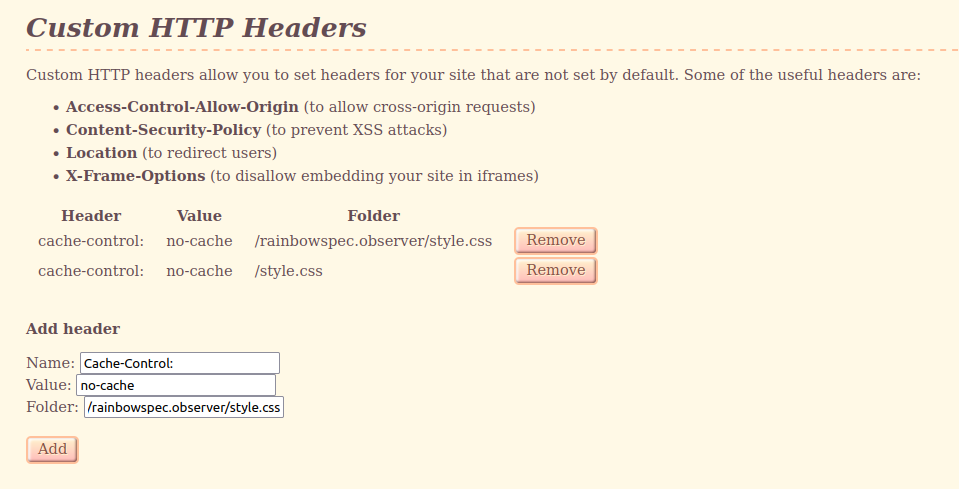
Here I already have the cache header, but I also filled it out in the text inputs as an example. Note that you can specify which file it applies to! Meaning I can put no-cache on my main stylesheet, without affecting anything else! You probably don't want no-cache on your favicon if you do not change it very often.
I have two headers here because I tried it with just /style.css but that did not appear to work, so I tried it with my full url, which did appear to work. I simply haven't deleted the first one yet.
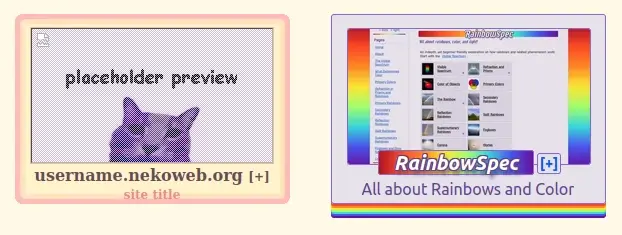
Siteboxes on the Nekoweb explore page, showing an unstyled versus styled box.
Editting the CSS in the elements.css file is relatively simple, but how you include an image in your site box is less clear. A relative path won't work (ex. nekothumb.webp), and neither will an absolute path (ex. https://rainbowspec.observer/nekothumb.webp). The elements.css file has a comment with a format for images, but it did not work for me as I have a custom domain rather than a nekoweb subdomain.
https://your-username.nekoweb.org/your-username.nekoweb.org/image.pngThe repetition is not a mistake. Now, this only works for those with a nekoweb subdomain, it doesn't if you have your own domain. Instead you'll have to do this:
https://your-username.nekoweb.org/your-domain/image.pngBasically you will have to insert your-username.nekoweb.org between https:// and your absolute path (replacing "your-username" with your actual username). Here's what mine would look like:
https://rainbowspec.nekoweb.org/rainbowspec.observer/nekothumb.webpEven though my domain is "rainbowspec.observer" I lead with rainbowspec.nekoweb.org, then my domain and normal file path.
If you have your image in a folder you will have to adjust the path accordingly: https://rainbowspec.nekoweb.org/rainbowspec.observer/images/nekothumb.webp
Note that this link would be used in the css as maybe a background image like so: background-image: url('https://rainbowspec.nekoweb.org/rainbowspec.observer/nekothumb.webp');
I later decided I liked the default screenshot better anyways and don't even use an image now. Regarless I wanted to publish my findings because it was very frustrating trying to figure out how to add an image with no clear guide. I ended up joining the nekoweb discord for a few minutes until I finally found something that helped. Begging people to write tutorials and guides that aren't hidden in discord servers, please.
That was just the filepath for using an image in your nekoweb site box, but here are some more tidbits for editting elements.css in general.
.site-box is the main container for your site box, you can give this a background, border, etc.site-box.site-box .sitefeature is the container for your site screenshot, this is what has the pink border
.site-box .sitefeature img is the screenshot, you can hide this with display: none;
.site-box > a > p is the bolded text under your screenshot with your url
font-size: 0; so I could replace it with my own text, which I did with:.site-box p:before {
content: 'RainbowSpec';
font-size: 20px;}.site-box > a > span is your site title under your url, to change this text you have to go to your home index.html file and edit the text within the title element.site-box .follow is the little follow button, you could probably change the actual text similar to how I changed my url to my site namepost-box and post-title are for your RSS feed on nekoweb, they do not affect your site box